
Multichannel CRM Request System: One Form, Every Team
Campaign requests for the EA SPORTS FC CRM team came in through several forms, spreadsheets and messages. Every team had its own queue, so nobody could see where a campaign stood. To fix that, I designed a CRM request system with one front door. A single form checks each submission, splits it into the right request for each team, and tracks every one back to one status trail. The framework is now being extended to Madden NFL, College Football, NHL, UFC and Battlefield.
- Marketing Automation
- Marketing Operations
- Process Design
- Multichannel CRM
- API Integration
Approved for testing.
My Role
This started as a team action item: make campaign requests easier to submit. I took it on and own it from start to finish.
Discovery
I mapped every team’s existing request form, field by field, into one set of questions.
Form design
I ordered the form the way a strategist plans, from channels to measurement, ending with a review screen.
Rules and routing
I defined the logic that turns one submission into the right request for each team.
Test build
I built a working version in n8n with mock data for leadership to try to break.
Rollout
I’m extending it to every franchise through per-franchise settings, not separate builds.
The Problem: One Campaign, Five Queues
One campaign often runs across email, in-game messages and a companion app. To launch it, a strategist had to brief design, request targeting, set up a new audience, ask analytics for a measurement plan and add rows to the content plan. Each team used a different form with different fields. As a result, the same campaign was described five times. Worse, a missed field meant a back-and-forth or a late start.
Repeated work
The same title, dates and audience were typed into every team’s form.
No single status
Progress lived in separate queues, so “where is my campaign?” took a round of messages.
Late surprises
Two campaigns could email the same audience on the same day without anyone noticing until the send.
How the CRM Request System Works
The form only collects what the strategist knows. Then the CRM request system does the rest in four steps: capture, qualify, route and track. Rules check the request and work out which teams need what. Next, they open each request in that team’s own queue, in the format the team already uses. In other words, teams keep working the way they do today. Only the way work arrives changes.
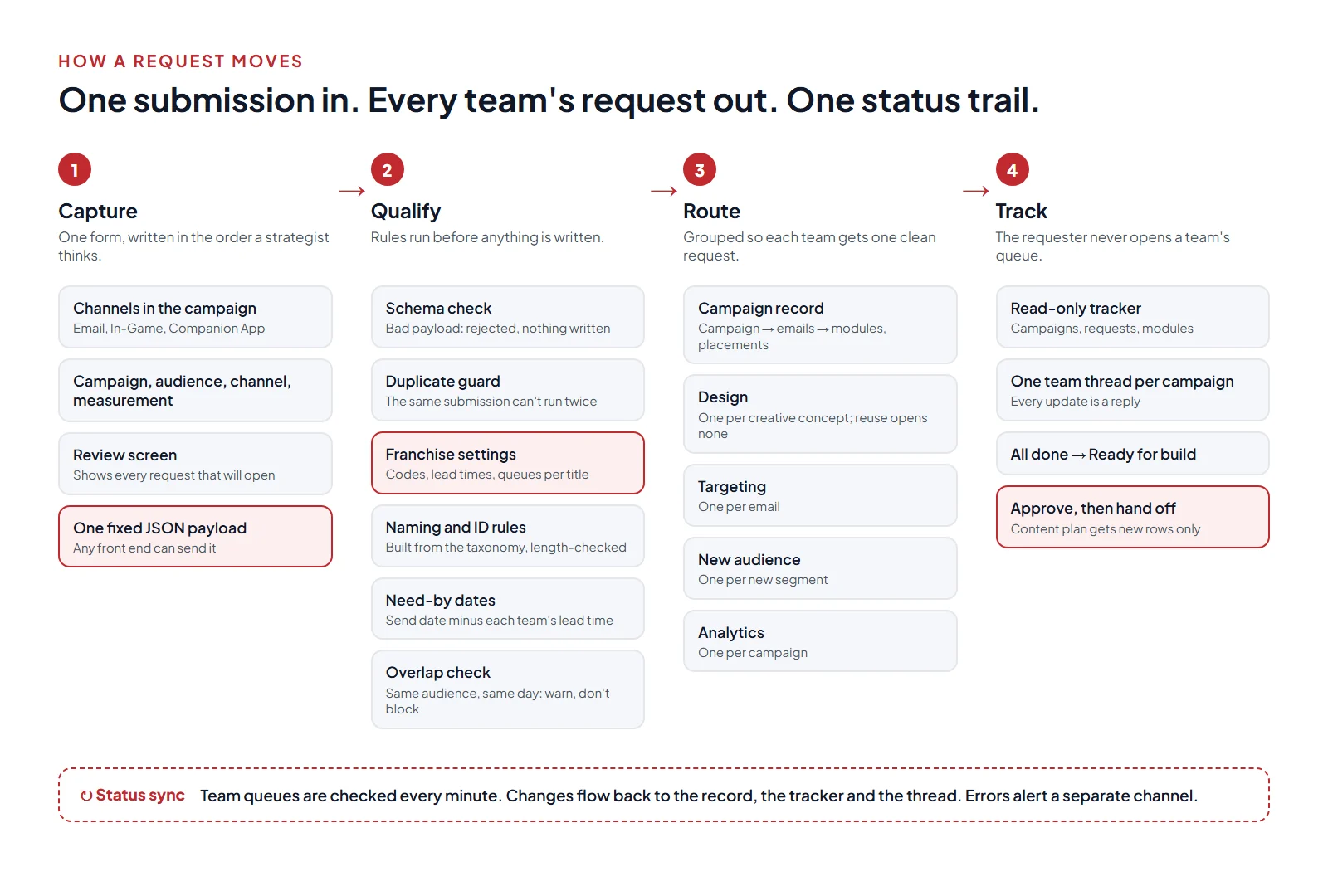
- 1Capture. One form, ordered the way a strategist plans: which channels, then the campaign, the audience, each channel’s details and how it will be measured. A review screen shows every request that will open before anything is sent.
- 2Qualify. Before anything is written, rules check the submission against a fixed schema and block duplicates. They also build names and IDs from the franchise’s naming rules and set each team’s need-by date from its lead time. Finally, they warn when the same audience is already getting a message that day.
- 3Route. The submission is grouped into clean requests: one design request per creative concept, one targeting request per email, one per new audience and one analytics request per campaign. Reused creative opens nothing.
- 4Track. Every campaign gets a read-only tracker row and one team thread. Status changes in any queue flow back as replies. Once every request is done, the campaign is marked ready for build.
A Form That Follows the Strategist
Early feedback was clear: the form should follow how a CRM specialist thinks, not how the databases are laid out. So the form opens with the channels in the campaign and only shows the pages those channels need. For example, audience questions appear only when email is ticked. Meanwhile, in-game and app placements get their own steps.
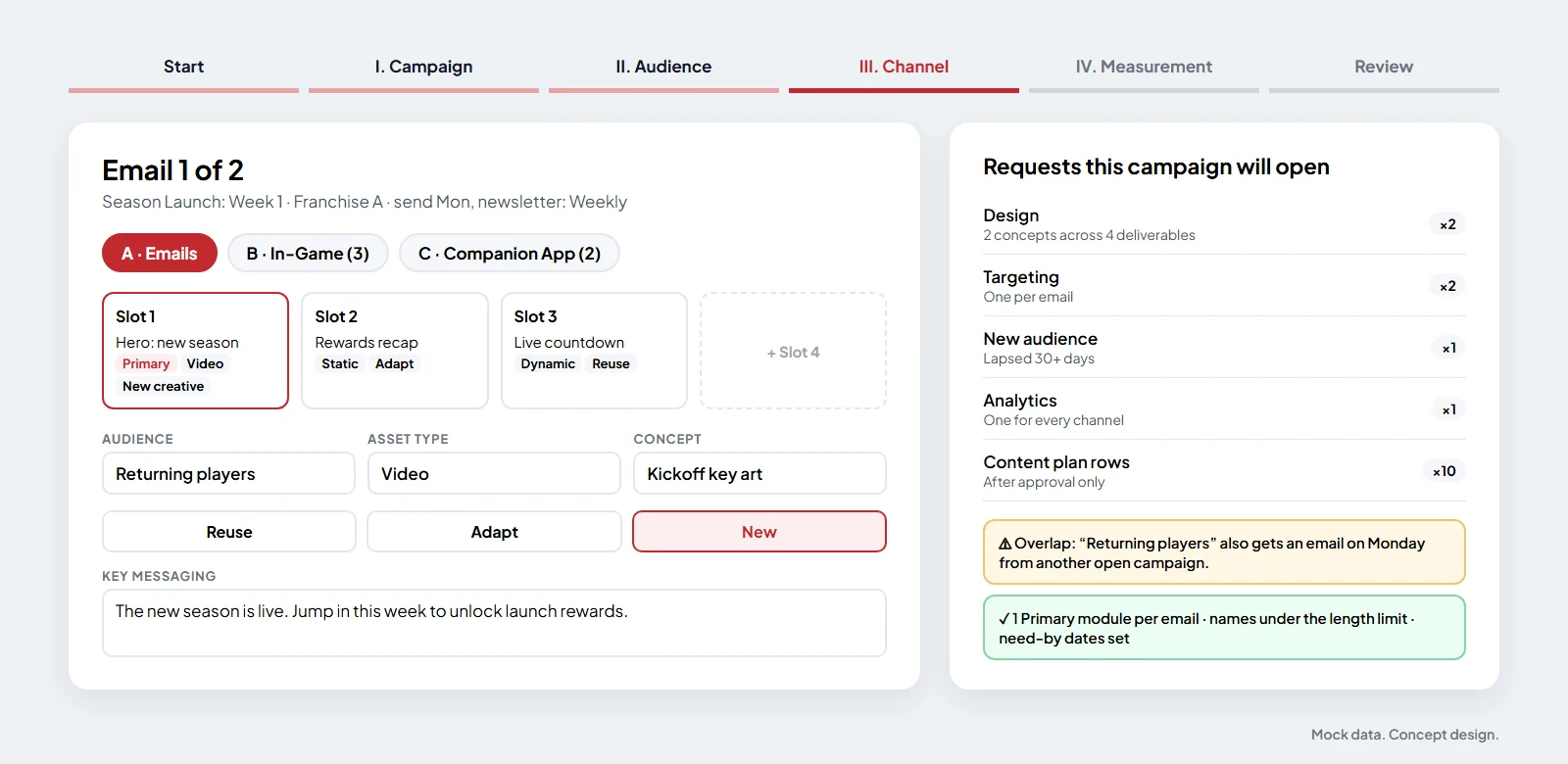
Send date and newsletter type, then up to four modules per email. Each module picks its asset type and whether the creative is reused, adapted or new.
In-game and app
Placement, live window, platforms, regions, call to action and frequency. “Same message as email module X” copies the messaging and links the concept.
Add to a campaign
Later additions attach to an open campaign, keep its numbering and reply in its existing thread, instead of starting over.
Review
Requests grouped by channel, plus an overlap warning and validation checks, before the strategist submits once.
One Framework, Many Franchises
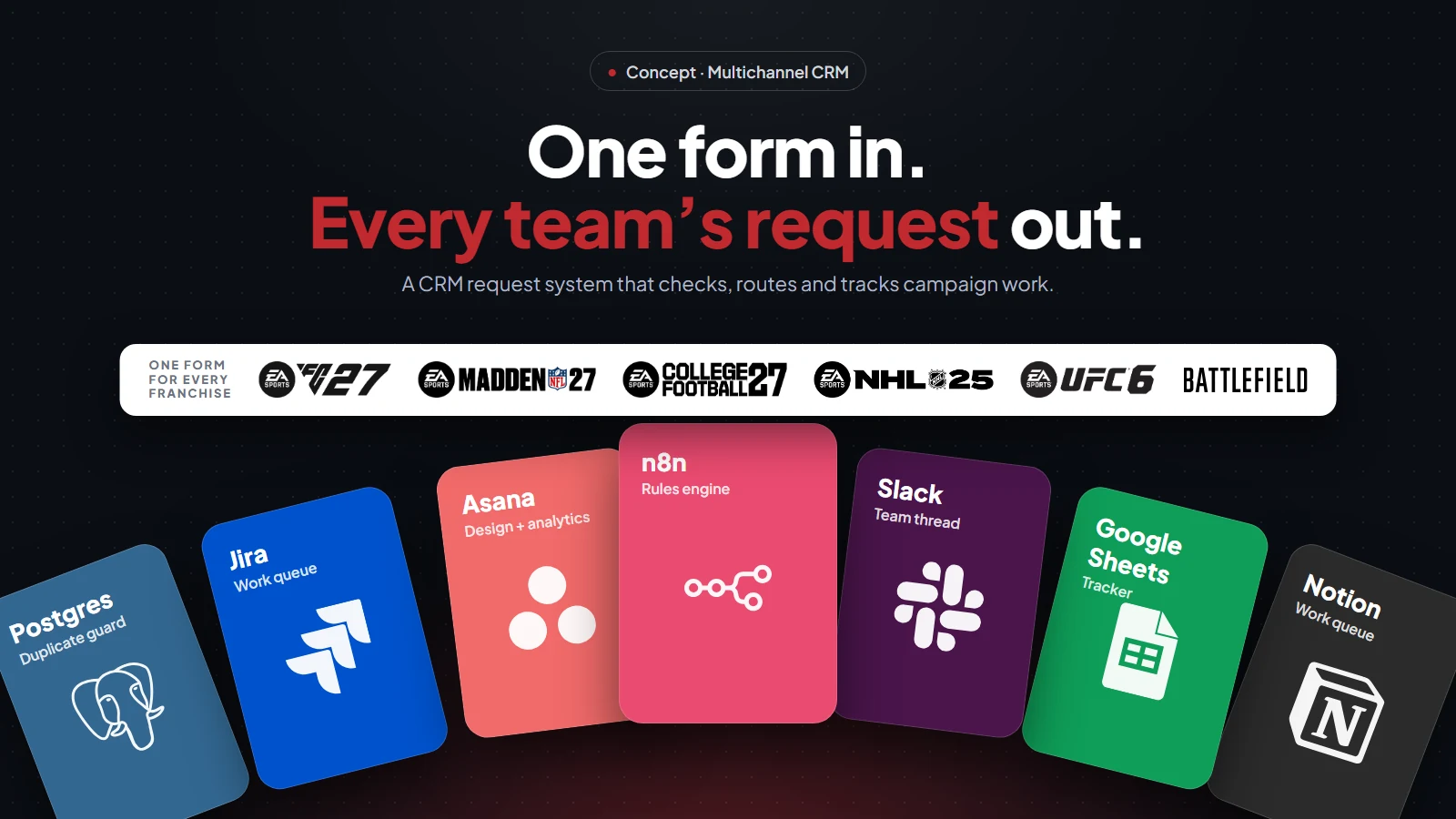
The first version was designed for EA SPORTS FC. Now the CRM request system is being extended to Madden NFL, College Football, NHL, UFC and Battlefield. Because of the design, that is a settings change, not a rebuild. Each franchise has its own naming codes, beats, lead times and work queues, so those live in a settings table the team can edit. However, the form, rules, IDs and tracking stay the same for every title.
Shared
The form flow, the payload schema, validation, grouping rules, IDs, the tracker and the team threads.
Per franchise
Naming codes and beats, placement codes, lead times by team, which queues receive which requests, and the team channel.
Per tool
Only the step that opens tasks changes between project tools. The same design works with Asana, Jira, monday.com, Trello or Notion.
Guardrails in the CRM Request System
- Nothing half-written An invalid request is rejected before any record or task is created.
- Exactly once A duplicate guard stops the same submission from opening every request twice.
- New rows only The shared content plan is never edited, and gets rows only after a human approves.
- Warn, don’t block Overlaps and past-due dates are flagged clearly, but the strategist stays in control.
The test build is meant to be broken. Leadership asked for a version they could try to break. So it includes a fault switch for testing failures and an alert channel for errors the workflow catches. It also has a mock content plan with realistic rows, all with mock data.
How Success Will Be Measured
The pilot is set up to answer a few plain questions, using timestamps the system already records:
Speed
Time from request to triage, and how often need-by dates are met.
Effort
Requests opened per campaign from a single submission, compared with briefing every team by hand.
Data quality
Campaign naming filled on every new content row, built from the taxonomy instead of typed by hand.
Risk
Audience overlaps caught before send, not after.
Where Else the Pattern Fits
Capture, qualify, route and track is not unique to CRM briefs. In fact, it is the same shape as lead capture on a website or a chatbot handoff. First, collect what the person knows. Then apply rules to qualify it, send it to the right team in their format, and keep one record of what happened next. Because every rule sits behind one fixed payload, a web page, a Slack form or a conversational assistant could all be the front door. The logic behind it stays the same.
Tech Stack
01 · Capture
A custom HTML request page, with an n8n Form fallback, posts one fixed JSON payload to a single webhook.
02 · Qualify
n8n checks the payload against JSON Schema and claims it in Postgres, so each submission runs exactly once.
03 · Route & Track
Tasks open through the Asana API; a Google Sheets tracker and one Slack thread per campaign carry every status change.
The CRM request system runs on n8n workflows behind one webhook, with the payload defined in JSON Schema.
- n8n
- Webhooks + JSON Schema
- Postgres
- Google Sheets
- Slack
- Asana API
- Custom HTML front end
Next, see the cross-channel CRM reporting engine, the FC 27 Club Membership campaign, or browse all projects.